
For hosts · Audio & video calling
FONO Host Registration — Audio & Video Calling
Join FONO as a streamer and earn beans through calls and gifts. Choose Audio Only or Audio & Video, then follow the registration and verification requirements for your region.
For approval, give this code
Choose how you want to participate
Audio Only
Take part through audio calls. The supplied policies show audio rates of 100–200 beans/min in India and 100–300 beans/min internationally, depending on level.
Audio & Video
Choose the option that includes video calling. The supplied regional tables list video rates of 100–600 beans/min, depending on level.
Call availability and rates depend on performance and Streamer Score. These ranges do not guarantee a particular number of calls or daily earnings.
How to get started as a host
Read the policy for your country before entering identity details. Follow the joining route provided for your account and choose your preferred call mode.
-
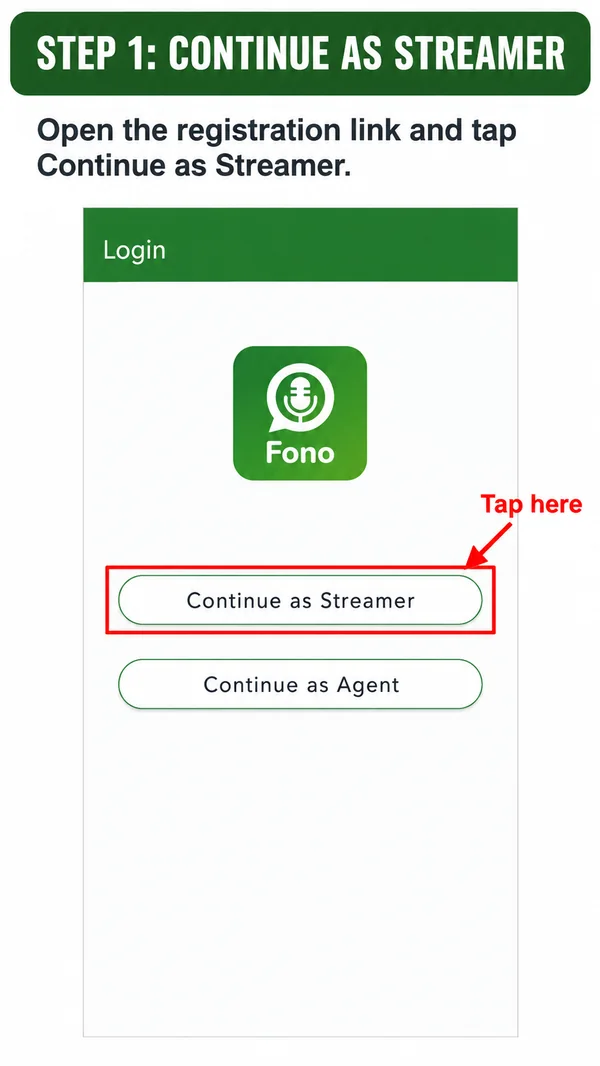
01 Step 1 of 10
Continue as Streamer
Open the registration link and tap Continue as Streamer.
-
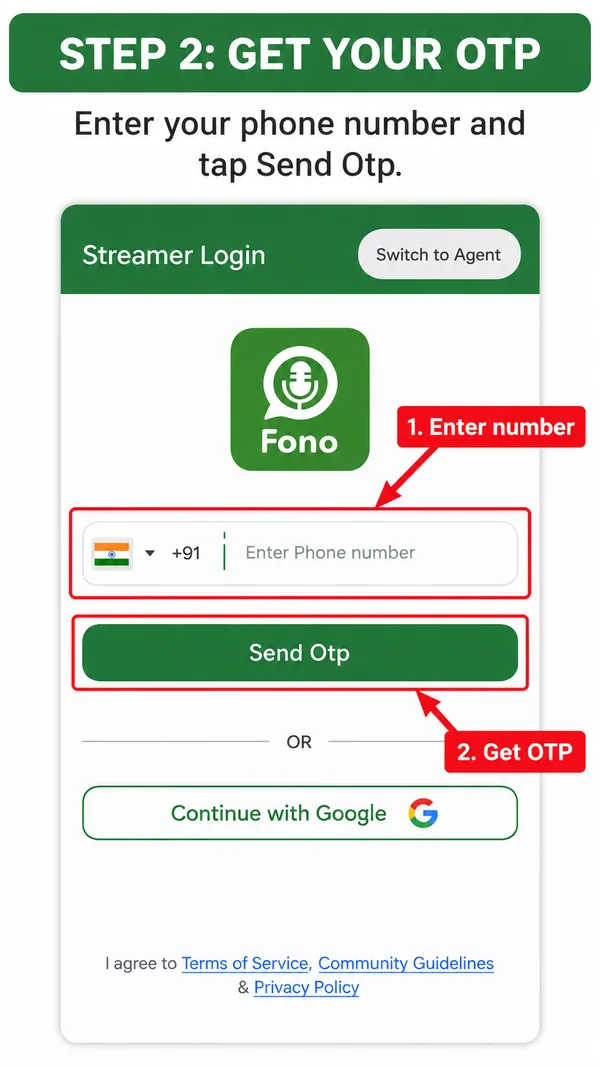
02 Step 2 of 10
Get your OTP
Enter your phone number and tap Send Otp.
-
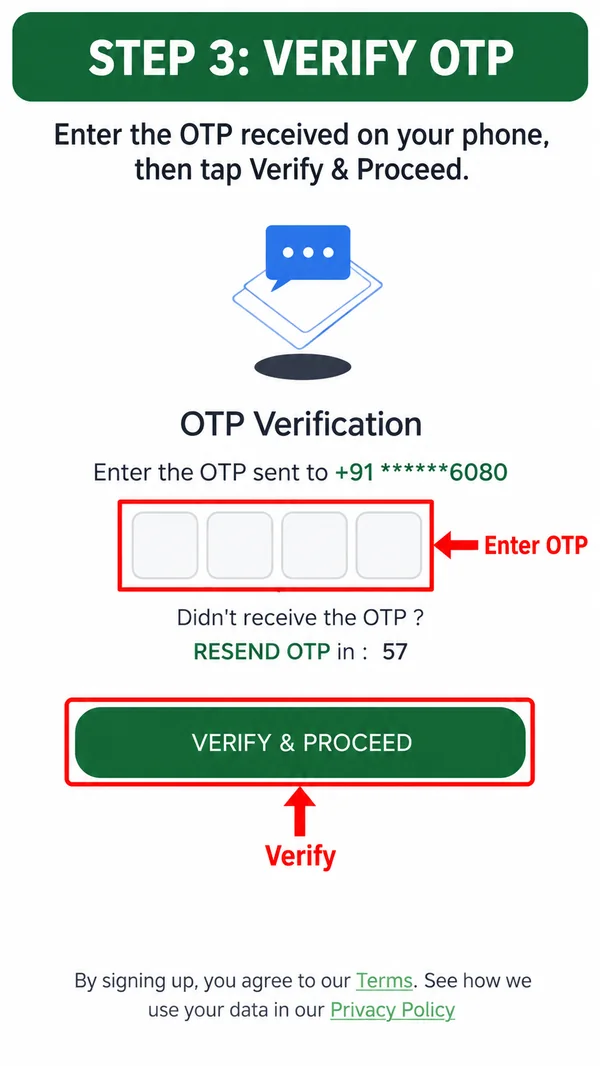
03 Step 3 of 10
Verify OTP
Enter the OTP received on your phone, then tap Verify & Proceed.
-
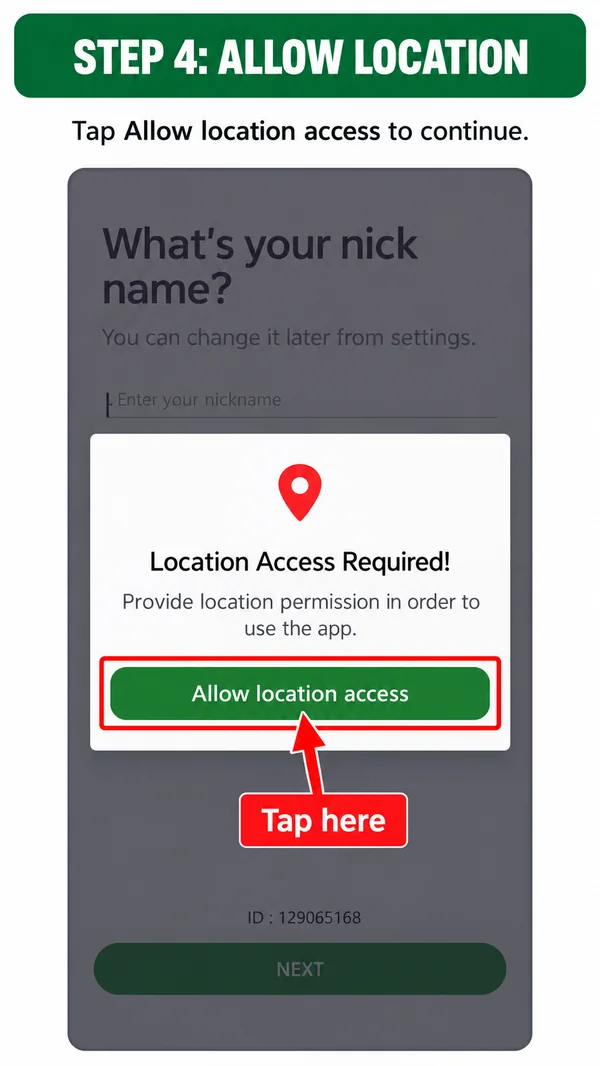
04 Step 4 of 10
Allow location
Tap Allow location access to continue.
-
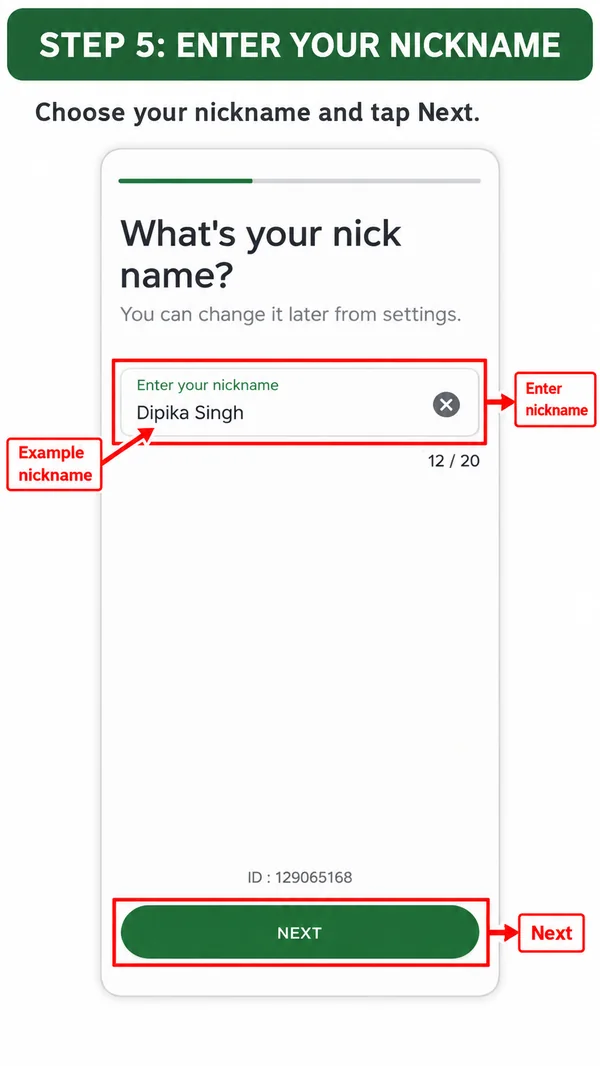
05 Step 5 of 10
Enter your nickname
Choose your nickname and tap Next.
-
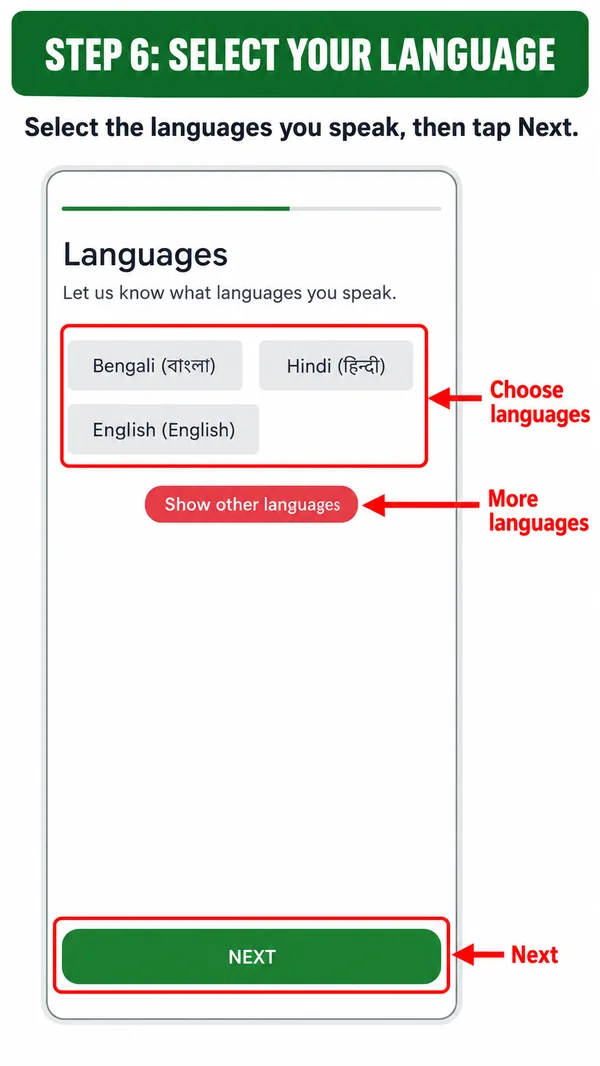
06 Step 6 of 10
Select your language
Select the languages you speak, then tap Next.
-
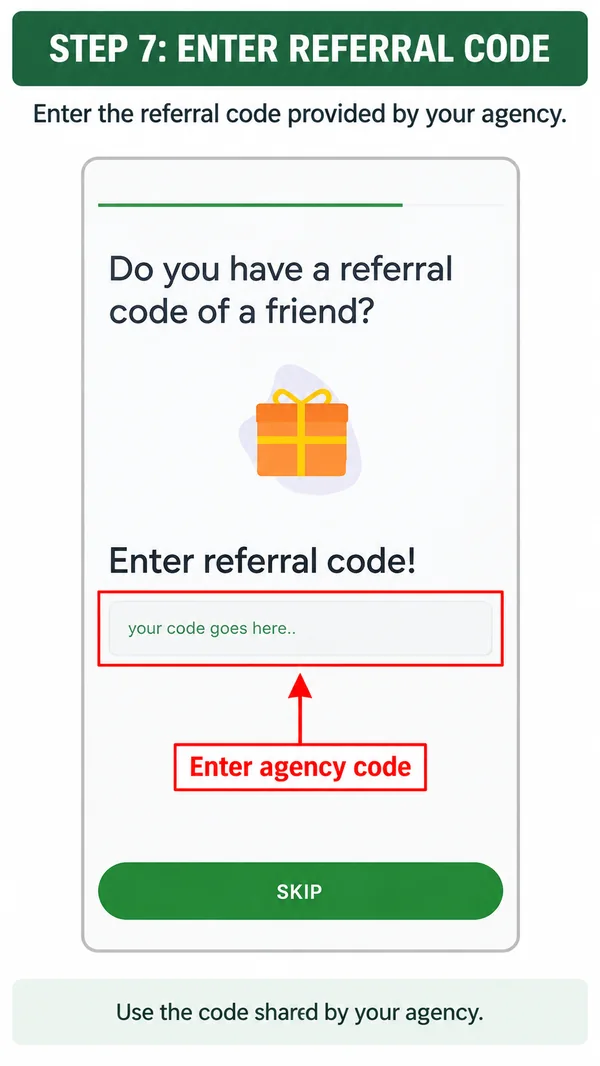
07 Step 7 of 10
Enter referral code
Enter the referral code provided by your agency.
Our agency code: FL4T32RS
-
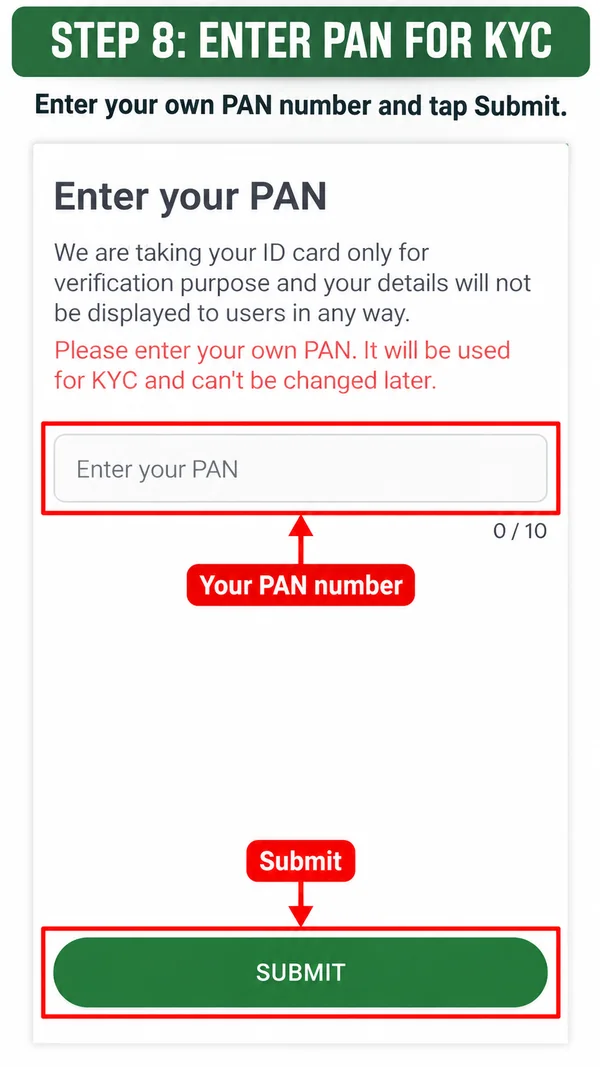
08 Step 8 of 10
Enter PAN for KYC
Enter your own PAN number and tap Submit. Your PAN is used for KYC and can’t be changed later. (International hosts use their own National ID instead.)
-
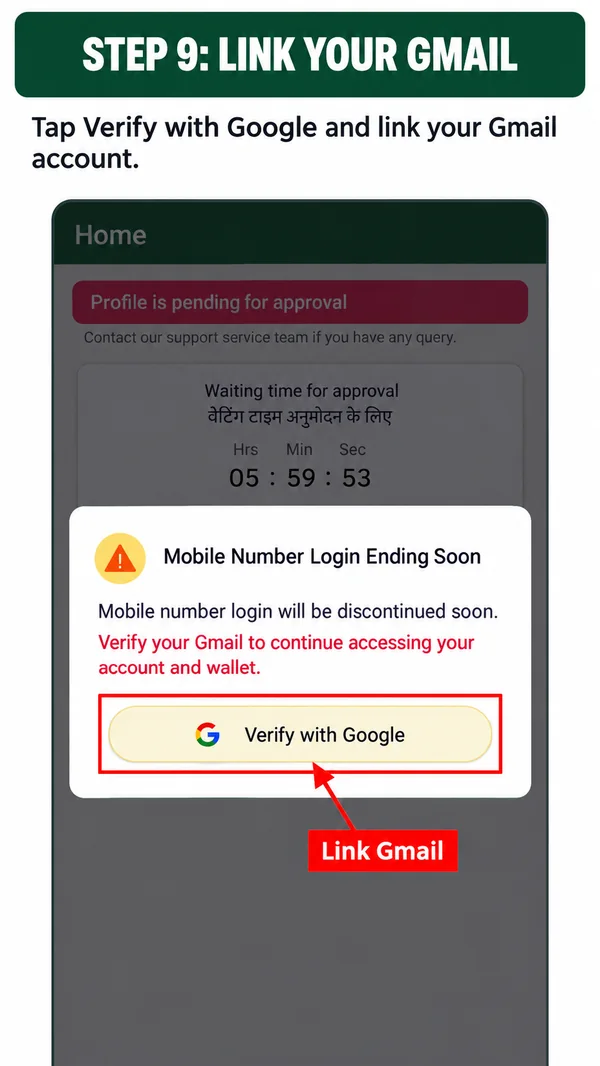
09 Step 9 of 10
Link your Gmail
Tap Verify with Google and link your Gmail account.
-
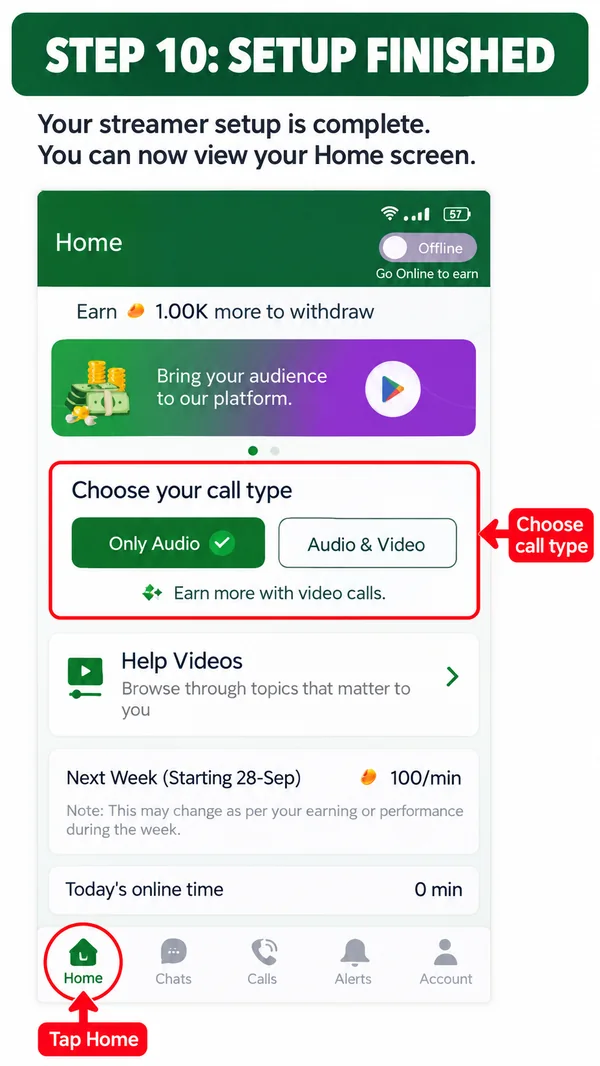
10 Step 10 of 10
Setup finished
Your streamer setup is complete. You can now view your Home screen and choose your call type: Only Audio or Audio & Video.
Read all 10 steps as text
- Continue as Streamer. Open the registration link and tap Continue as Streamer.
- Get your OTP. Enter your phone number and tap Send Otp.
- Verify OTP. Enter the OTP received on your phone, then tap Verify & Proceed.
- Allow location. Tap Allow location access to continue.
- Enter your nickname. Choose your nickname and tap Next.
- Select your language. Select the languages you speak, then tap Next.
- Enter referral code. Enter the referral code provided by your agency.
- Enter PAN for KYC. Enter your own PAN number and tap Submit. Your PAN is used for KYC and can’t be changed later. (International hosts use their own National ID instead.)
- Link your Gmail. Tap Verify with Google and link your Gmail account.
- Setup finished. Your streamer setup is complete. You can now view your Home screen and choose your call type: Only Audio or Audio & Video.
What verification information do you need?
| Requirement | India | International |
|---|---|---|
| Public profile picture | Not required by the supplied policy | Not required by the supplied policy |
| Onboarding identity | Your own PAN number | Your own National ID |
| Video requirement described | No audition video required for onboarding | KYC verification video needed for withdrawal |
Use your own identity information. The policies state that using someone else's identity details can prevent you from withdrawing beans later.
भारतीय होस्ट के लिए: ऑनबोर्डिंग में अपना PAN नंबर ही दें। कॉल रेट और निकासी की शर्तों के लिए India Policy पढ़ें।
How hosts earn beans
Hosts earn through audio calls, video calls and gifts. Call earnings depend on the applicable rate and paid call duration. Gift earnings depend on the gifts received.
30 min× 100 beans/min =3,000 beans
For example, 30 minutes at 100 beans/min equals 3,000 beans. This is a calculation example, not a promise of available call time or daily earnings.
Understand Streamer Score
The supplied policies link call flow and call rates to weekly earnings and performance. They describe an average score of 70 and scores above 90 for the top 50 hosts at the time of the documents.
Check your own current score and rate in the app. The policy does not publish an exact formula for calculating or increasing the score.
Know your withdrawal threshold
Indian streamers
5,000 beans first
5,000 beans for the first withdrawal, then 20,000 beans for subsequent withdrawals.
International streamers
30,000 beans minimum
30,000 beans minimum, with the withdrawal verification requirements and Epay process.
Host registration questions
Do I need to show a profile photo?
Neither supplied regional policy requires a public profile picture. Identity checks still apply.
Can I choose audio without video?
Yes. The onboarding material includes an Audio Only option. Select the participation mode you intend to use.
Do Indian hosts need National ID or PAN?
The supplied Indian policy specifies the host's own PAN number. The international policy specifies the host's own National ID.
Is an audition or KYC video required?
The Indian policy says an audition video is not needed for onboarding. The international policy requires a KYC verification video for withdrawal. Follow any account-specific verification instructions shown in the app.
When will my account be approved?
The supplied policies do not promise an approval time. Check the status through your joining process or ask for guidance if you are unsure what to do next.
Need help joining?
Tell us your country and whether you prefer audio calls or audio and video. Please do not send PAN, National ID, passwords or OTPs in an initial inquiry.